Desktop tools, made properly.
Built one piece at a time, and tested on the machine it runs on.
Crews
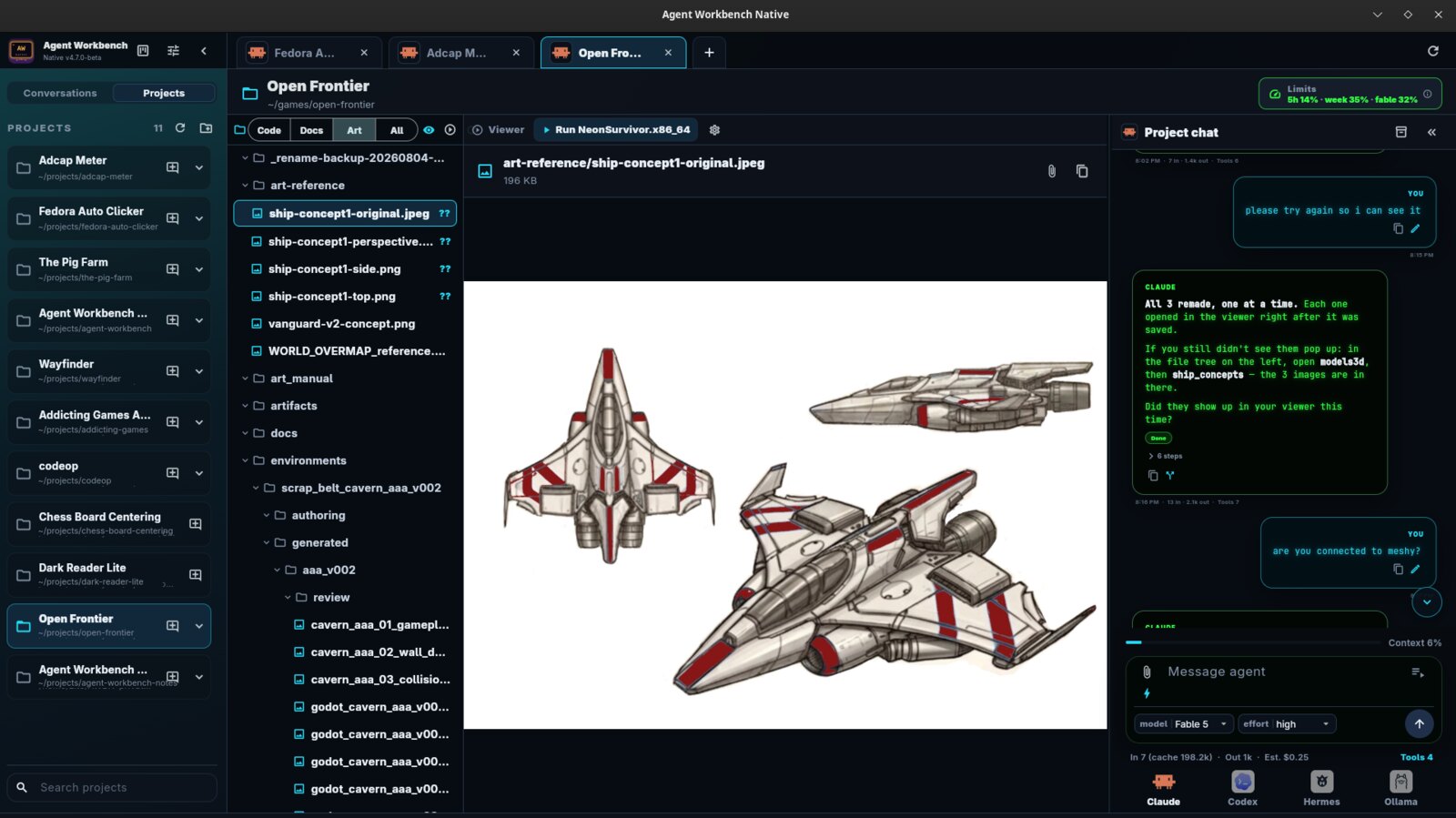
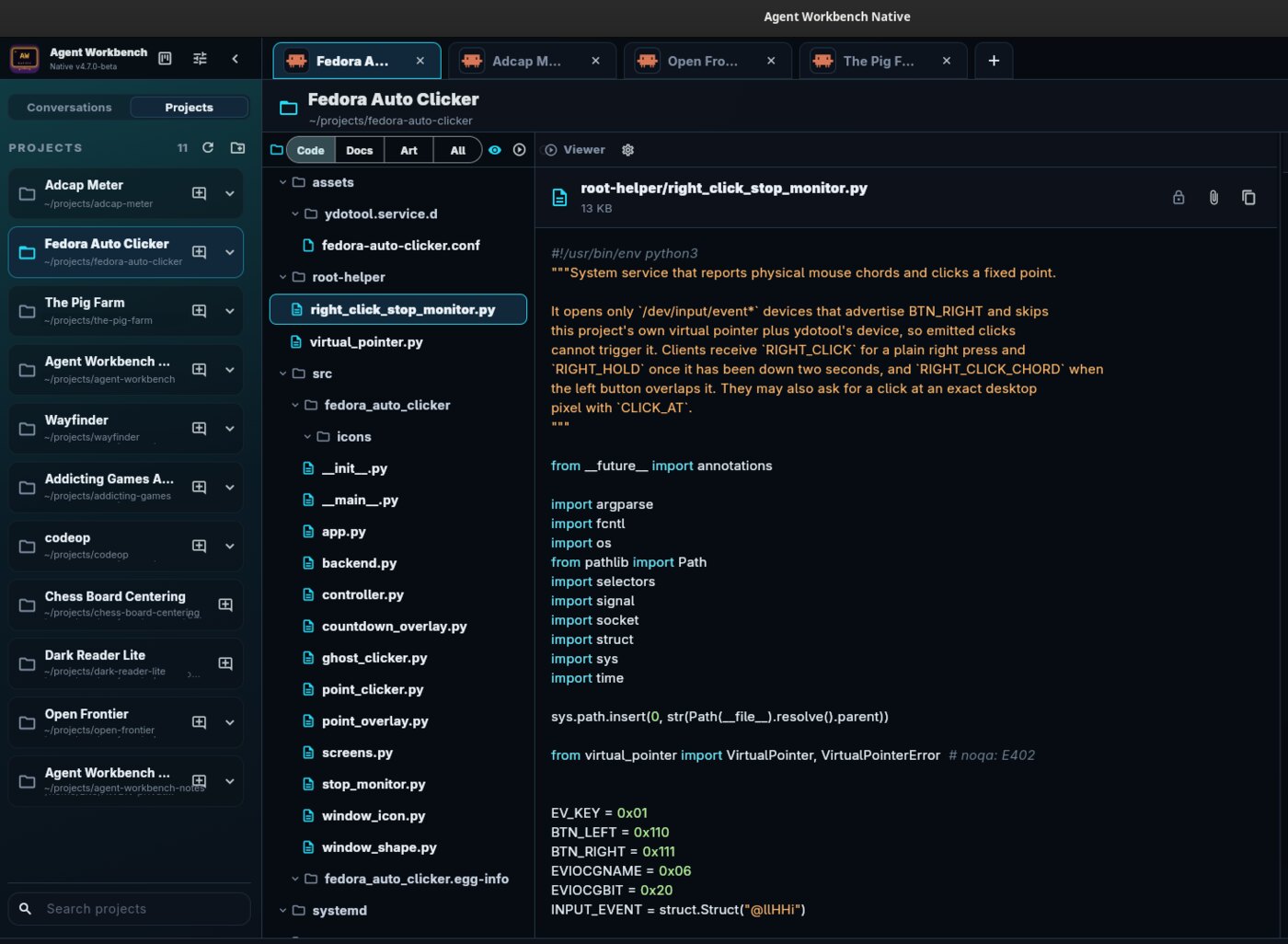
Beta · LinuxOpen it and get to work. Crews is a desktop app for AI coding agents. It handles the setup, the juggling and the plumbing. You say what you want done.
Compatible with command-line AI assistants. Pick yours at setup and sign in with your own account. You watch the work happen instead of waiting for an answer, and you see what a turn costs while it runs. Your projects and settings stay on your computer. What you type in a chat is sent to the assistant you picked.
- Keeps its train of thought. Hand a full chat to a fresh one, context and all.
- Watch it work. Files open and scroll to the line being changed.
- Answers type out live. Not dumped at the end.
- Built to be read. Seven fonts. Chat and code zoom separately.
- Light. Under 3% of one core sitting idle.
- Yours alone. Your machine, your accounts, your disk.
- Compatible with command-line AI assistants. Pick yours at setup and sign in with your own account.
- See the cost. Tokens, cost and tool calls for each turn, when the assistant reports them.
- Linux x86-64 only. No Windows, macOS or ARM build.
- Still in beta. Keep your projects in Git and keep backups.
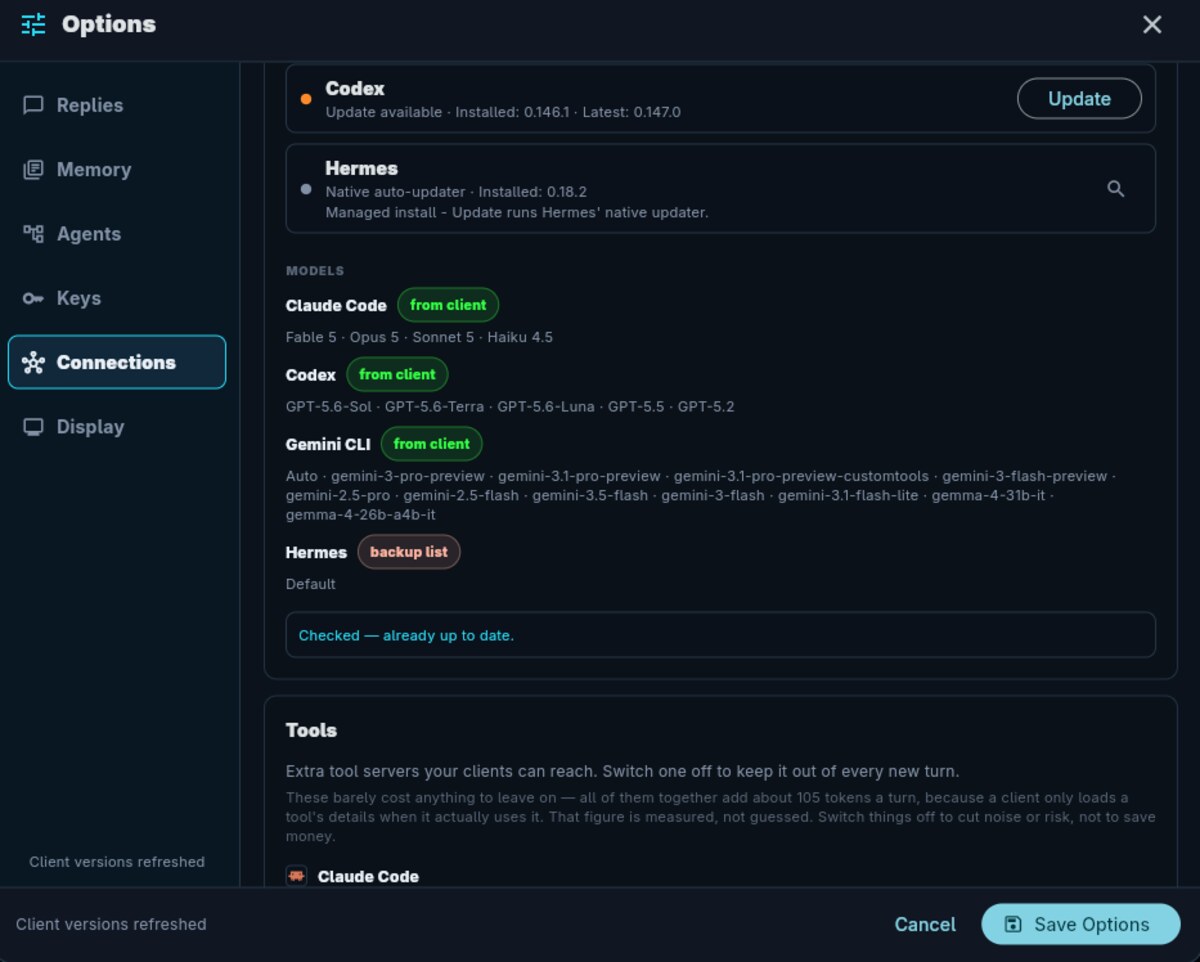
- Tools other than the four built in need their command entering by hand, in Options, Agents, Custom clients.
- A Windows version is built but has never been run on Windows, so nothing about it is proven.
Open it and it installs. Ubuntu, Debian, Mint, Pop!_OS.
Something else? portable file · .tar.gz · checksums
The portable file installs nothing, but your browser saves it without permission to run. Right-click it → Properties → allow it to run as a program, then open it. The installer above needs none of that.
Crews Lite
Free · LinuxThree AI agents on one job, in one window. Crews Lite is the crew part of Crews on its own, in plain Python. No desktop app, no account, no server. It opens three Claude Code chats side by side and lets them work the job between them.
A Coordinator plans the work and talks to you. An Architect reads the code and writes one job at a time. A Builder does the job and reports back. The two workers hand off to each other by writing a file; a small relay sees the file and types one line into the other chat. Nothing long is ever typed into a pane, because a long message is re-read on every later turn, and that is where the money goes.
- You are not the messenger. The agents hand work to each other while you watch.
- Built to be cheap. Work lives in files; what crosses between agents is one line.
- It survives a full chat. When one runs out of room it writes a handoff, and the next one picks the job up.
- Readable. Seven small scripts and seven Markdown rule pages. No build step.
- Yours to change. The rules the agents follow are plain Markdown. Edit them and the next message obeys.
- Nothing phones home. No telemetry, no account, no server of mine anywhere in it.
- You test what it built. The crew writes a numbered checklist;
checkrunshows it one step at a time and you click Worked, Broken or Skipped. Your answers go straight back to the crew.
- Linux with KDE's Konsole. The panes are Konsole profiles and the relay types into them over D-Bus.
- You bring your own agents. It runs
claude, and optionallycodex, signed in with your own accounts. - Three agents talking is three agents billed. Watch your own usage for the first few rounds.
- No installer and no updates. Download it again for a newer one.
- The
checkruntest window needs PyQt6. Everything else is plain Python.
Unpack it and run ./install.sh. It copies the scripts to
~/bin and the rule pages to ~/agent-docs,
needs no root, and writes nothing outside your home folder. Then:
pqpw new myapp "My App" and crews.
Checksums are in SHA256SUMS.
CodeOp
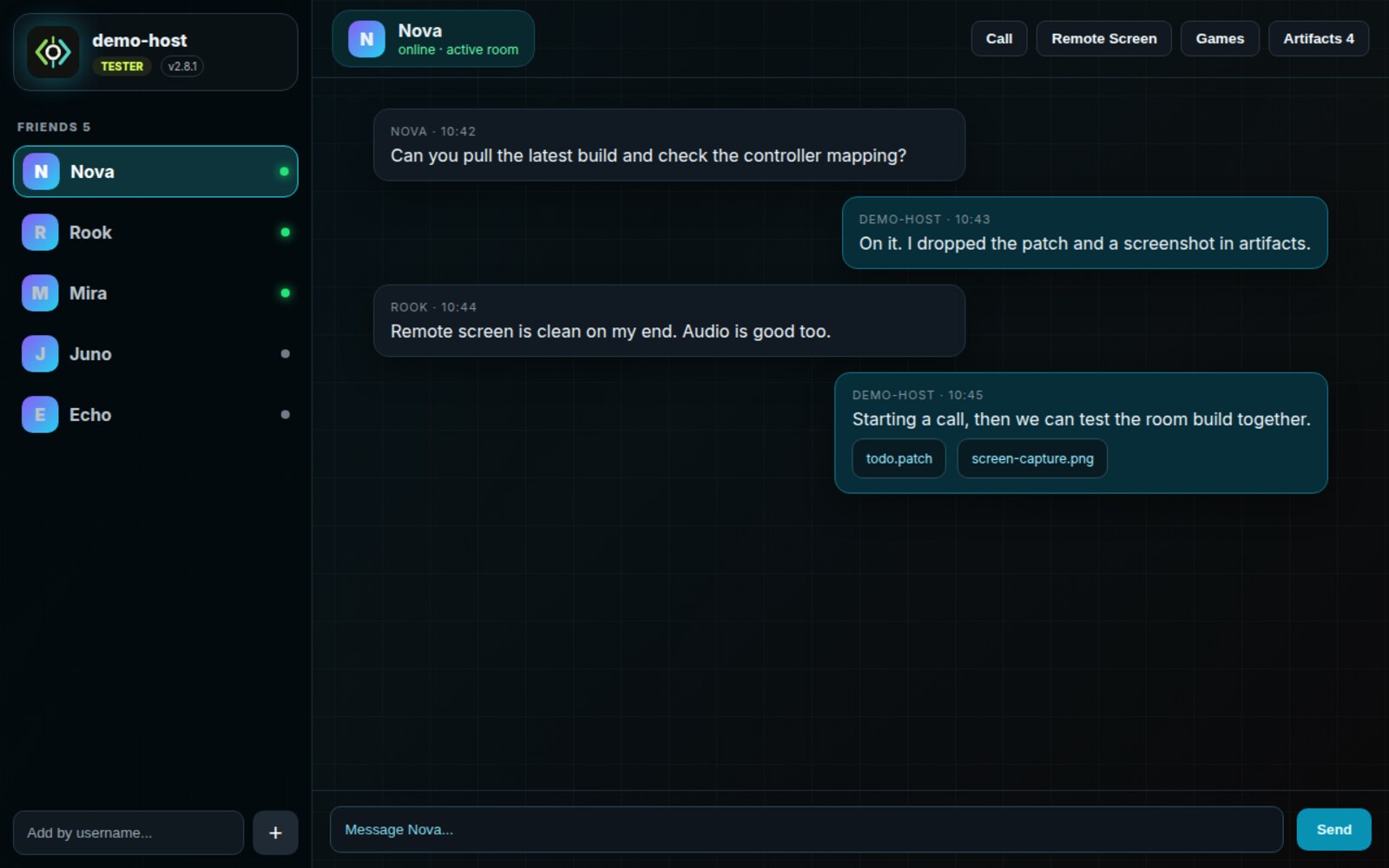
BetaA private room for playtesting with friends. Chat, share builds, jump on a call, share a screen, and break each other's games before anyone else does.
- Brand-new Windows build. Use headphones on calls for now.
- Screen sharing works on Linux. It is not switched on for Windows in this build yet.
- The screen sharing fix has not yet been proven between two machines.
- Quiet microphones: still finding the cause rather than papering over it.
- Not code-signed, so Windows warns about it.
- No Mac version.
Windows: right-click the downloaded zip and choose "Extract All", open the extracted folder, then double-click "Install CodeOp.cmd". You get CodeOp in the Start Menu and on the Desktop. Linux: open it and it installs (Ubuntu, Debian, Mint, Pop!_OS).
CodeOp is invite-only right now. To get it, email support@kadaken.com. Existing testers keep getting updates inside the app.
If Windows blocks it: CodeOp is not code-signed yet, so Windows treats it as an unknown app.
- "Windows protected your PC" - click More info, then Run anyway.
- "Smart App Control blocked a file that may be unsafe", or a Bad Image error naming a .dll - that is Smart App Control, and it only runs apps signed by an authority it recognises. Marking the file as trusted does not help. The only ways past it are to turn Smart App Control off in Windows Security (App & browser control), which Windows will not let you undo without resetting the PC, or to wait for a signed build. Signing is being sorted out.
Something else? portable file · checksums
Wayfinder
BetaA file manager for Linux that shows you the file, not just its name. The preview sits docked beside the list, so you can see what something is before you open it.
- Linux only. No Windows or Mac version.
- Rebuilt from scratch to be properly native, and still catching up with the older version it replaced.
- Dragging files has only been tested in code, never with a real mouse.
- Batch rename, Open with and Properties still open as separate windows and can land in the wrong place.
- Using it as the file picker in other apps is on hold until Linux gives it a way in.
I built it on Fedora 44. It needs GTK 4.22 and libadwaita 1.9.
Unpack it and run ./install.sh, no root needed.
How this gets built, and where to find me
Kadaken is one person working with AI assistants, including Claude, Codex and Gemini. That is stated plainly because it is how the work actually happens, and because you should know what you are running. Every release is built, tested and shipped by a human who is accountable for it, and every claim on this site came off a real build rather than a press release.
There is one place to talk about any of it, including the apps whose source is not public. You do not need a bug to post. If something worked, that is genuinely useful to know, because otherwise the only signal that reaches me is a download counter.
The rest of it
Games have their own page, and the small one-off tools have theirs.